Put the floating launcher on your product
Configure the pill button and its quick-action menu, install it with the user's identity, and feed Product Analytics.
The floating launcher is a small pill button, "Support" by default, that opens a help panel: search and read your knowledge base, send you a message that becomes a ticket, suggest an improvement, and any links you add. It is lighter than the Support Hub, has no chat of its own, and is meant for inside your product, on every page.
It is also what feeds Product Analytics. When the launcher is installed with the logged-in user's identity, every page load records that the person was in the product, and every help search is logged. Without the identity attributes it is just a button. See Product Analytics for what that data becomes.
Before you start: a role with Manage support widgets. The tag and its attributes are covered for developers in Floating launcher.
Everything is under Settings → Support Widgets → Floating Launcher.
Appearance
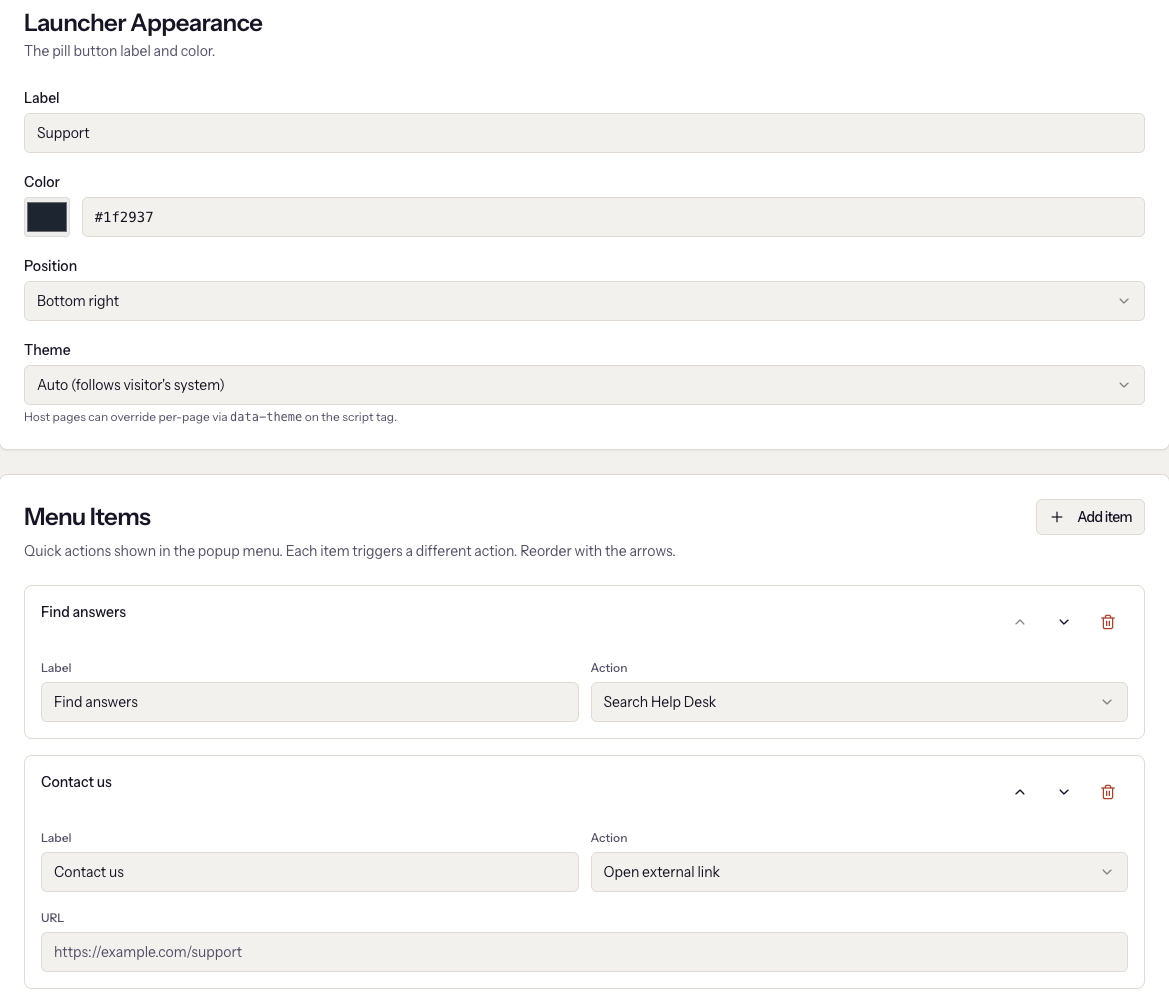
Label is the text on the pill, up to 40 characters. Color is its
background. Position is one of the four corners. Theme follows the
visitor's system by default, or can be always light or always dark; a host
page can override it per page with data-theme on the script tag.
Knowledge base and messages
Two switches decide what the panel can do beyond its menu. Both are on by default.
Knowledge base puts a search box at the top of the panel and lets visitors browse categories and read articles without leaving your product. Only articles that are Published with Public visibility appear, the same rule as the help centre. This does not depend on the help centre being switched on; an article shows an "Open in the help centre" link only when it is.
Send us a message adds a form that creates a ticket. Choose the Support channel for messages: the ticket gets that channel's SLA clock, priority, and assignment rule, exactly as an inbound email would, and the assignee is notified. If the channel's sending address is verified, the visitor receives a confirmation from it, and replying to that email adds to the ticket. If it is not verified, the ticket is still created and Settings shows an amber note. With no support channel connected at all, the form stays hidden until one is; see Connect a support inbox.
A visitor who cannot find an answer is offered the message form from the empty search result and from the bottom of every article, with the subject filled in.
Menu items
Each item is one row on the panel's home screen. Click Add item, give it a Label, and pick an Action:
| Action | What happens |
|---|---|
| Knowledge base (search and browse) | Opens the knowledge base view |
| Send us a message (creates a ticket) | Opens the message form |
| Suggest an improvement form | The feature request form; submissions land in Support → Feature Requests |
| Open external link | Goes to the URL you enter |
| Open chat (link to chat page) | Goes to the Chat page URL you enter, such as a page where the Support Hub is installed |
A knowledge base or message item is hidden while its switch above is off. If messages are on but no item opens them, the panel adds a "Send us a message" row on its own, so a menu configured before this existed does not need editing.
A link with no URL is dropped from the menu
An Open external link or Open chat item with an empty URL is left out of the visitor's menu. Settings shows a warning under the empty field. Two of the default items, "Contact us" and "Support page", start with no URL, so they do nothing until you fill them in or remove them.
Reorder with the arrows and click Save changes. Changes reach visitors within about a minute; the launcher caches its configuration briefly.
Install it
The Install card offers two snippets. Use the second one.
- Basic carries only the workspace id. The launcher works, nothing is attributed, and Product Analytics stays empty.
- With user identity (recommended) adds the user's name, email, and company as attributes. Replace the placeholder values with the real ones when your app renders the page. With these set, feature requests carry the submitter, the person is created as a contact on first load, and their presence in the product is recorded.
Paste it inside <head> or before </body> on every page of the product.
If the chat widget is already on the site, the note under the snippets
applies: you can pass your existing widget id instead of the company id and
the launcher resolves the workspace from it.
What it records
With identity set, on page load the launcher finds or creates the contact by email and links it to the account named in the company attribute. That happens once per six hours per browser, so it does not fire on every page. Each help search is logged with the query and whether it found anything. Feature requests are tagged with the submitter. A message becomes a ticket linked to the contact and their account, marked Launcher in the tickets inbox, and reading an article in the panel counts as a view for that article.
When it goes wrong
- The launcher is not on the page. The tag is missing, or the console shows that the workspace id could not be resolved. The developer guide lists the console messages.
- Product Analytics shows nothing. The basic snippet was used. Switch to the identity snippet; data starts with the next page load.
- Feature requests show as Anonymous. Same cause.
- A menu item is missing for visitors. It is a link with no URL; the settings page marks it in amber.
- Search returns nothing. No published public articles match. Publishing is covered in Write and publish articles.
- The panel has no "Send us a message" row. Messages are off, or no support channel is connected. The Knowledge base and messages card says which.
- Visitors do not get a confirmation email. The chosen channel's sending address is not verified. Verify it under Settings → Email sending; tickets were created regardless.
Next
Turn on AI, so the widget and your inboxes can answer on their own.